


BA (Hons) Degree in Computing
Final Year Project Report
(2000/2001)

Analysis of ICQ
Protocol
|
Supervisor |
: Dr. Rocky Chang |
|
Co-examiner |
: Dr. Alvin Chan |
|
Student |
: Yu Tsun Bon |
|
Student ID |
: 97120526d |
|
Class |
: 6110 - 4 |
|
Submission date |
: 28th April 2001 |
Abstract
There are many applications that provide presence and instant messaging services. However, these two services usually exist independently. Moreover, different applications developed by different vendors will deploy different protocols. Thus the leak of intercommunication between two different applications is the main problem.
In this project, ICQ protocol was analyzed in two aspects, presence and messenger services. After having the idea of how ICQ protocol works, ICQ protocol is compared with the IMPP requirements (Instant Messaging and Presence Protocol) proposed by IETF Network Working Group.
To analyze the ICQ protocol version 5, the ICQ packets were captured in hexadecimals and convert the data into some meaningful data that people can read and understand. A SOCKS5 proxy server is setup to test the ICQ protocol traverses through SOCKS5 Proxy. Using the obtained data to investigate the operations of ICQ again the investigations are mainly focus on the presence and instant messaging services.
The result of the analysis of ICQ protocol shows that ICQ protocol version 5 met most of the requirements proposed in the memo rfc2779.
Acknowledgements
I would like to take this opportunity to thank my supervisor Dr. Rocky Chang, for his great enthusiasm on assistance of problem solving, he always gives invaluable advices to me and guides me to meet the requirements. He helps me to find those RFC proposed documents, e.g. RFC 2779 (IMPP requirements) and RFC 2778 (A Model for Presence and Instant Messaging). He also gives me the very useful web sites about ICQ protocol. If not, this project will not be possible without the help of Dr. Rocky Chang.
Also, I would like to thank my co-examiner, Dr. Alvin Chan, to my project report and presentation.
Furthermore, I would like to say thanks to the technical support team for preparation of PCs for my final year project. Also, I want to thank all the people in the mailing list “The ICQ-devel” for their kindly help and advices.
CHAPTER TWO – LITERATURE REVIEW
CHAPTER THREE - PROJECT METHODOLGY
3.1 Tools used to analyze
basic operation of ICQ and ICQ protocol
CHAPTER FOUR – ICQ PROTCOL EXPERIMENTAL RESULTS
4.3 Peer to peer
communication
CHAPTER FIVE – DISCUSSION OF THE
ICQ PROTOCOL AND IMPP REQUIREMENTS
5.1 Comparison of ICQ
protocol against IMPP requirements
LIST OF FIGURES
Figure 2. Socks5 proxy
running on Linux 6.0
Figure 4. Operation of
ICQSniff
Figure 5. Experimental
setup to investigate ICQ protocol
Figure 6. Setup to test ICQ
protocol passes through SOCKS5 firewall
Figure 7. Setup to test ICQ
protocol passes through SOCKS5 server
Table 1. Experimental setup
conditions
Table 2. The configuration
modified in order to use ICQProxy
Figure 14. Message sent
through server
Figure 15. Logical diagram
of operation of ICQProxy
Figure 16. Security setting
of ICQ
Figure 17. Authorization
request
Figure 19. Choose the type
of firewall.
Figure 18. Locate the
firewall and the port.
Figure 19. Test the
firewall setting.
Figure 20. Test the
firewall setting (server side)
Figure 21. SOCKS5 user
authentication using password
Figure 22. SOCKS5 user
authentication using password (server side)
CHAPTER
ONE – OVERVIEW
1. Introduction
As the development of network technology, the electronic mail is a very convenient way to exchange information. However, some users still think that the electronic mails are not transferred in “real-time”. Some people say that electronic mail is suitable for sending “letter” form of messages, which are relatively long in length. How about a user want to send a relatively short, urgent and real-time message? E.g. “Peter, come to see me immediately.” Instant Messaging service is developed to allow users to send messages in REAL-TIME.
1.1 Instant Messenger (IM)
Instant Messenger lets users to send electronic messages back and forth to other online users in real-time. Instant Messenger is faster than email and more private than traditional public chat rooms.
1.2 What is ICQ
ICQ stands for “I Seek You”. It is a program invented by Mirabilis. Mirabilis was founded in July 1996 by four young Israeli computer users. Yair Goldfinger, Sefi Vigiser, Arik Vardi, and Amnon Amir created the company in order to introduce a new communication tool for the Internet. At that time, Internet provided a connection for each people but the interconnections among users were still missing. As a result, they developed the technology to allow people connecting to the Internet to find and locate each other more easily and provide them a tool to communicate with each other. In November 1996, the first version of ICQ was introduced to the Internet.
ICQ is a program, which combined the Instant Messaging and Presence services. ICQ allows you to see whenever your friends are online i.e. allows you to see the presence information of your friends. You can also send text messages, URLs, chat requests, greeting cards, voice messages and transfer files. Now the latest version of ICQ provides SMS service (Short Messages System, is a technology used in cellular phones to send text messages to and from cellular phones.). ICQ also has the highest amount of users among other instant messengers, such as AIM (AOL Instant Messenger), Yahoo Instant Messenger and MSN Instant Messenger.
Restrictively speaking, ICQ is a program called Internet buddy list. The goal of the buddy list is to let you see which of your friends are online, so you can send instant messages to them.
1.3 Problem definition
ICQ, one of the most popular online conferencing systems introduces a deep impact in the way that human communicated. The user-friendly interface makes it easy to use. Single clicked of the “send” button allows you to communicate with friends on the other side of the Internet. However, the poor design of ICQ protocol makes it easy to be attacked. ICQ is not designed for mission critical applications and does not in any way guarantee users’ security. If the risk of exposure your information is unacceptable to you or if you do not want to expose IP address to other people, you should not use ICQ for information exchange.
Firewall is a component or set of components that restricted access between a protected network and the Internet, or between other sets of networks. Since Mirabilis has announced that the latest version of ICQ (ICQ2000a and above) could overcome the problem of using ICQ behind firewall. There might be something new introduced in ICQ protocol.
The lack of standards causes some serious disadvantages to the users of Instant Messengers. Unlike email, which all tend to support standards such as SMTP and POP3. Instant Messengers from different vendors cannot talk to each other and users using the same program may not always be able to traverse Firewall.
Fortunately, the IETF Network Working Group defined a standard protocol so that independent applications of instant messaging and presence could communicate with each other.
Since ICQ is an application that combines Instant Messaging and Presence services, it should follow the standard proposed by IEFT Network Working Group in the document rfc2997.
1.4 Objective
In this project, the ICQ protocol was investigated in order to understand the operation of ICQ. From the operation of ICQ, got some ideas of why ICQ was so insecure. A single homed Linux based Socks5 proxy was setup to test the ICQ behind firewall. ICQ2000 and ICQ98 were compared to see how ICQ2000 overcame the problem of using ICQ behind firewall. Also, the ICQ protocol was compared against the IMPP (Instant Messaging and Presence Protocol) Requirements defined by Network Working Group.
CHAPTER TWO – LITERATURE REVIEW
Most versions of ICQ protocol have been un-covered by a group of random users with common interest. However, each new version of ICQ client is introduced new features. Although the development of ICQ protocol version 5 is stopped, there are still many mysteries about ICQ protocol version 5.
On the Internet, there is a document about the ICQ protocol version 5,Version 5 of the ICQ protocol, by Henrik Isaksson. This document is still being updated time from time. Also since the ICQ protocol version 5 using ckeckcode to encrypt the packet for security, to investigate the ICQ protocol version 5 I needed to know the algorithm for ICQ to encrypt data.
In this project, I analyzed ICQ protocol version 5. There is a mailing list, the ICQ-devel list, all of the people joint this mailing list are interested in ICQ protocol and willing to hear and answer the questions. I have got many advices from this mailing list.
Although there is a document about ICQ protocol, the document does not mention about the details of how the ICQ protocol works related to its functions. Also the document does not robust since two versions of clients using the same protocol may have different packets for the same function. I have to read the document first and then use some tools to capture the packets and decrypted the packets when necessary. Sometimes when some unknown packets appear, I have to investigate these new packets and reverse engineer to find the packet format.
2.1 Related reading
- Version 5 of the ICQ protocol
This is a document with excellent description of the version 5 protocol. This document is written based on the version 5 protocol used by ICQ client 98. This document is not robust and being updated time from time.
- ENCRYPTION and CHECKCODE of the
ICQ Protocol V4
This document explains the algorithm of ENCRYPTION and how the CHECKCODE is calculated in the version 4 of the ICQ Protocol.
- ENCRYPTION and CHECKCODE of the
ICQ Protocol V5
This document explains the algorithm of ENCRYPTION and how the CHECKCODE is calculated in the version 4 of the ICQ Protocol.
- SOCKS5 Proxy Mini-HOWTO
This Mini-HOWTO provides a good explanation of how to setup a SOCKS5 proxy on Linux.
- Instant Messaging / Presence
Protocol Requirements, rfc2997
This document provides the requirements for Instant Messaging and Presence Protocol Requirement defined by Network Working Group. The goal of the Instant Messaging and Presence Protocol (IMPP) Working Group is to define a standard protocol so that independently developed applications of instant messaging and/or presence can interoperate across the Internet.
2.2 Work has been done
In this project, I used the analyzer and ICQSniff to capture the ICQ packets. From the sequence of packets I got, worked backward to know the operation of ICQ. During the experimental phrase, I got some packets those did not be described in the document “Version 5 of the ICQ protocol”. I analyzed these packets based on the certain situation of ICQ client to guess when would these packets be used. Repeatedly test the client under the same situation to capture the packets for analysis. After reading the document “ENCRYPTION and CHECKCODE of the ICQ Protocol V5”, I can decrypt the packets when necessary. With the decryption knowledge in mind, it is easy to do the reverse engineering of ICQ protocol. I have found the layout of the new packets I found during the experiment and send the packet specification to the author of the ICQ Protocol web site. I think the document will be updated next time.
In this project, I used the ICQ99 client for protocol analysis. Although ICQ99 is also using version 5 of the ICQ protocol, there are many new packets that are not described in the document. These new packets are newly introduced in ICQ99. Some protocol specifications I have worked out and will be described in CHAPTER FOUR. These packets may not be found in the document “Version 5 of the ICQ Protocol”.
In order to examine the ICQ protocol
traversal through SOCKS5 Proxy. I have to get some ideas of how the SOCKS5
Proxy actually works in protocol level. The document, rfc1928 (http://www.socks.nec.com/rfc/rfc1928.txt),
“SOCKS Version 5
Protocol” provides the full picture of how SOCKS5 Proxy works. At the same time
I have to setup a SOCKS5 Proxy server running on Linux 6.2. A SOCKS5 Proxy
server is setup to test the ICQ protocol passes through Firewall.
(SOCKS5
Proxy can be download from http://www.socks.nec.com/cgi-bin/download.pl)
Since analyzer will capture all the packets on the LAN, I setup the whole experimental setup in an internal LAN. The whole experimental setups are shown in CHAPTER THREE.
ICQ is one of the Instant Messengers and there is a memo “Instant Messaging and Presence Protocol Requirements”, rfc2779, defined by Network Working Group. So it is very interesting to analyze the ICQ Protocol and compare the ICQ protocol against the IMPP requirements defined by Network Working Group. The comparison between the ICQ Protocol and the IMMP requirements is presented in CHAPTER FIVE. Besides just compare the protocol, I will explain how the requirements are meet by ICQ protocol and give some real examples.
CHAPTER THREE - PROJECT METHODOLGY
To investigate the ICQ protocol, the following tools were used to facilitate the work.
3.1 Tools used to analyze basic operation of ICQ and ICQ protocol
1) WinPcap + Analyzer
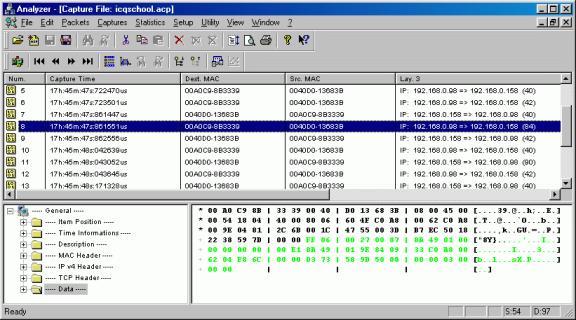
Figure 1. WinPcap
WinPcap is a program for capturing packets and network analysis for the Win32 platforms. Analyzer is a full configurable network analyzer program for Win32 platforms. Analyzer is able to capture packets on all platforms supported by WinPcap. Generally speaking, analyzer provided a nice interface for user to use the WinPcap.
I used WinPcap to capture all the data in the experiments and used analyzer to analyze the data. Analyzer analyzes the data based on the header of the packets. It shows the data in tree structure and shows the content of the header e.g. IP addresses, Ports and the real data.
2) TracePlus32
TracePlus32 is a powerful application-level diagnostic tool for Winsock available for Win32 platforms. TracePlus32 is both a full-featured Winsock spy and data analysis tool.
TracePlus32 provides a very good feature to allow the user to examine only the sockets opened on local host. I used TracePlus32 to examine the sockets opened during the experiment.
3) ICQProxy
ICQProxy is an application that runs in your computer acting as a Socks proxy server. ICQ sends data to the ICQProxy client running on the local machine, which then tunneled the data over HTTP to one of the ICQProxy server. This server then sent that data to the real ICQ server. By doing so, the people were allowed to using ICQ behind a firewall.
ICQProxy is one of the solutions to use ICQ behind firewalls. I used ICQProxy to test the ICQ protocol pass through our campus’ HTTP proxy (proxy.polyu.edu.hk:8181).
4) Socks 5 proxy firewall
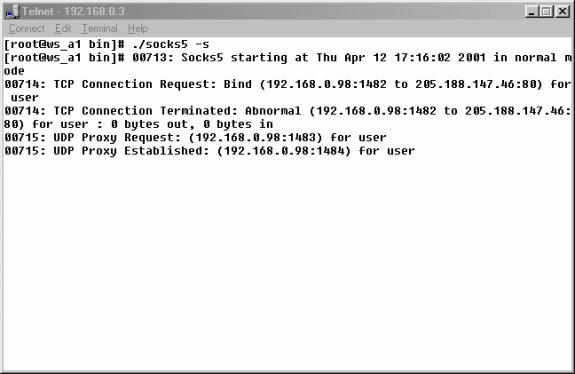
Figure 2. Socks5 proxy running on Linux 6.0
The SOCKS protocol is an open Internet standard (IETF RFC1928) for performing network proxying at the transport layer. SOCKS created a proxy which serves as a data channel for TCP communication or UDP communication based on client and server. SOCKS 5 proxy now was freely available for academic use.
I used SOCKS5 Proxy to test the ICQ protocol. In the experiment, packets were captured by WinPcap and examined to see what modifications had been done on the ICQ protocol when configured the ICQ client to support SOCKS Proxy.
5) ICQSniff
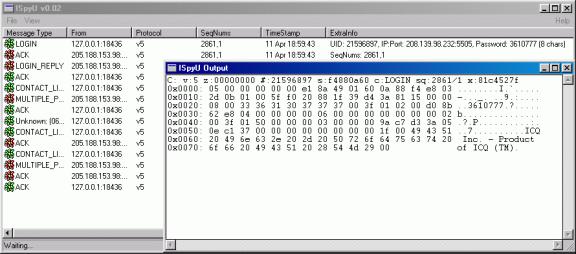
Figure 3. ICQSniff
ICQSniff is an ICQ protocol version5 sniffer. It only supports the protocol between client to server and server to client. ICQSniff is running as server and client on local machine at the same time. The server part received data from your ICQ client while client part received data from server.
I used ICQSniff to decrypt all the packets sent from client to server. From the decrypted packets, work backward to understand how ICQ protocol works.
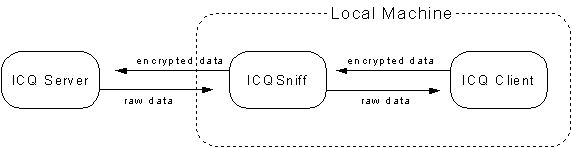
Figure 4. Operation of ICQSniff
3.2 Experimental setup

Figure 5. Experimental setup to investigate ICQ protocol

Figure 6. Setup to test ICQ protocol passes through SOCKS5 firewall
Experimental setup to test ICQ protocol passes through SOCKS5 Proxy
In this experiment, since the ICQ peer to peer communication will use random port for communicating, I had to configure the router to make sure only allow the traffic between SOCKS5 server and external network. All the traffic from client machine to external network would be blocked.
First, I had to setup a SOCKS5 Proxy server. I chose to setup a single homed SOCKS5 Proxy server running on Linux 6.2. The SOCKS5 server was configured to accept all the packets from private LAN (192.168.0.0). There is new feature of SOCKS5 to perform authentication. Thus there are two configurations.
1. Allows any authentication, no proxy to other hosts on the internal subnet, and allows all hosts on the internal subnet to use the socks server.
2. Enable Username/Password authentication in your SOCKS v5 environment, user has to input the user name and password in order to use the socks server.
The socks5 daemon reads the configuration file when it starts and each time it receives an HUP signal. The configuration file contains the information the server needs to determine:
· The interface to use to reach an address
· When the server should connect directly to an address
· When the server should use another proxy server
· The necessary requirements to make a proxy connection
The configuration file is usually located
at etc/socks5.conf.
The entries of the configure without authentication is
#etc/socks5.conf
without user authentication
auth
- - -
permit
- - 192.168.0. - - -
set
SOCKS5_V4SUPPORT
For the configuration with user authentication, another file that contains username/password pair was created. The file is located etc/socks5.passwd. The socks5.conf file for user authentication is
# etc/socks5.conf with user authentication
auth - - u
permit - - 192.168.0. - - -
# Userlist is a comma-separated
list of individual users, with no white space and no wild card patterns.
permit u - - - - - david
set SOCKS5_V4SUPPORT
The entries for socks5.passwd is
# etc/socks5.passwd
david 12345
The setup of this experiment is shown below

Figure 7. Setup to test ICQ protocol passes through SOCKS5 server
1) The traffic between client machine and SOCKS5 Proxy server.
2) The traffic between SOCKS5 Proxy server and the router.
|
Machine |
IP address |
|
Client machine |
192.168.0.98 |
|
SOCKS5 Proxy server |
192.168.0.3 |
|
Router |
192.168.0.1 |
Table 1. Experimental setup conditions
In this setup, the client machine would send all the packets to SOCKS5 Proxy server first. Of course the packets sent from client machine must contain the SOCKS5 protocol header. If the packet does not contain SOCKS5 protocol header, SOCKS5 Proxy server will reject the packet.
Setup to test ICQProxy
ICQProxy is a program that will redirect the packets from ICQ client to the outside world through the famous http port 80 using the technique of HTTP tunneling. The ICQproxy acts as a local SOCKS Proxy server. The ICQProxy is designed for all versions of ICQ protocols. Since it only encapsulates the packet by HTTP header, it would not modify the data of the packet.
To use the ICQProxy, the default configuration of ICQ client has to be modified.
|
Item to change |
Original setting |
New setting |
|
ICQ server |
icq.mirabilis.com |
127.0.0.1 (Localhost) |
|
Port number |
4000 |
1080 (Default port for SOCKS server) |
|
Proxy server |
Do not behind SOCKS server |
Using SOCKS Proxy server |
Table 2. The configuration modified in order to use ICQProxy
In this setup, the ICQ client first sent the packets to ICQProxy, which served as SOCKS Proxy server running on the local host. The ICQProxy then uses the HTTP tunneling to encapsulate the packets and sent the packet as the http protocol through Firewall.
CHAPTER
FOUR – ICQ
PROTCOL EXPERIMENTAL RESULTS
3.1 Main Features of ICQ
There are several features those make ICQ so popular. There are some brief descriptions about main features of ICQ. After having the ideas of the main features of ICQ, it is easier to understand the purposes of some specific packets.
|
Figure 8. ICQ contact list |
The picture on the left hand side shows the contact list (buddy list) of ICQ99. On the top, the number “21596897” is my ICQ UIN (User Identify Number). Each ICQ account is assigned a unique UIN. This UIN is also associated to the message inbox. ICQ server will use this number to distinguish user from user. From the contact list, you can see the status of each user. “Online” means the user is connecting to the Internet. “Offline” means the user is disconnecting from the Internet, turning off the ICQ or enabling the invisible status. “Not In List” means the user is not added to your contact list. However, the user can still send message to you but the message must “sent through server”. “Random” means the user got your online information from the “Random chat” At the bottom of the contact list, there is your own status “Online”. |
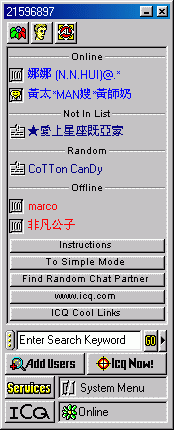
|
Figure 9. ICQ features |
The picture on the left hand side shows all the functions what a user can perform. This menu appears when you click on a particular user on your contact list. “Message” allows you to send instant messages to this particular user. “File” allows you to send file directly to this particular user. “Web Page Address (URL)” allows you to send URL to this particular user. “ICQ Chat” allows you to send chat request to this particular user. |
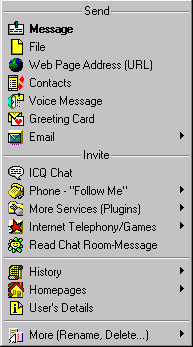
|
Figure 10. Message dialogue |
The picture on the left hand side shows the message dialogue that is used to send instant message to a particular user. After typing the message you want to send, click the “Send” button. The message is sent immediately. |
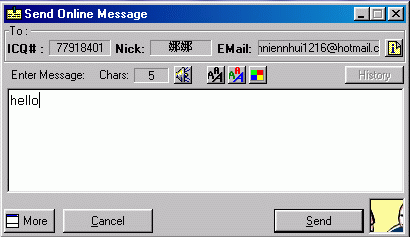
|
Figure 11. Send file |
Figure 4 shows the dialogue when you want to send file to a particular user. From the dialogue you can know the destination user, file name and file size. |

|
Figure 12. Send URL |
Figure 5 shows the dialogue when you want to send URL to a particular user. From the dialogue you can get the information of the destination user, the URL and the description about the URL. When the user receives this URL on the other side, the user can invoke the browser to browse the URL. |

|
Figure 13 ICQ chat |
Figure 6 shows the window when you want to send ICQ chat request to a user. The window shows the information about the user whom you want to chat to and the topic of your chat. |
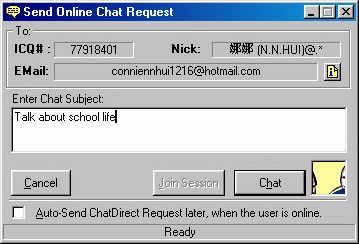
3.2 Basic operation of ICQ
In theory, for most buddy list applications you need to register yourself by some information, it is usually your IP address, which will enable others to see and message you. The buddy list application then pings somewhere (maybe server or individual) to see who’s online.
There are two ways to communicate with the buddy in your buddy list, depending on what kind of buddy list you are using. They are peer-to-peer or peer-to-server. Peer-to-peer allows you to make directly connection to your buddy’s system via Internet. Peer-to-server allows the buddy list’s server keep track of IP address and serves as a middleman when you communicate with your buddy.
It is not yet proven that which architecture is better. For example, a peer-to-server system depends on the company’s server working normally and running for the buddy list application to work while a peer-to-peer system is more difficult to deal with dynamic IP addresses, which maybe change each time a user logs on. As a result, most buddy lists use a combination of both architectures.
ICQ is an example, which combines both architectures to accomplish its goal. There are three kinds of communications in ICQ. They are client to server, server to client and client to client. The basic operation of ICQ99 is as following
1. In ICQ99, once ICQ detected the PC is connected to the Internet the client sent the first packet, which contained protocol version, UIN (User Identify Number), command (will be explained later), time of login, your TCP listening port, which will listening for direct TCP connection, your IP address and your password etc.
2. After the server received the first packet and validated it was correct. The server would send some data back to inform the client to continue sending data.
3. Client then sent second packet, which contained the information to tell server which users you wished to receive their online/offline status.
4. Server then sent the status of your buddy to you.
5. ICQ99 login process finished.
However, latest version of ICQ (ICQ2000) deploys a new protocol and the operation has been slightly changed. The basic operation of ICQ2000 is as following
1. In ICQ2000, once the TCP connection between client and server was established, the client would not send the packet first and wait until receiving the packet from server. The first packet told to the client that the server was ready for function.
2. Upon receiving the packet from server, client would send the first packet, which contained the UIN, command, your TCP listening port for listening incoming connection, your IP address and password.
3. After server received the first packet and sent back the acknowledgement, client would send the SignOn command. (I have no idea why the client needed to send the SignOn command. Because what ICQ could do now is SignOn only).
4. When server received the SignOn command and verified correctly, it would send the packets to inform client that it was ready to begin services.
5. After client got the “Host Ready” from server, client would send client version information to server. And server would send the raw data back.
6. It was time for client to know how fast client could send data to server. So client sent the packet called “Rate Request”. Server also sent back the “Rate Response”. Finally, client sent back “Rate Acknowledgement”.
7. Once the negotiation completed, client started to send buddy list to server in order to get the status of your buddies.
8. ICQ2000 login process completed.
As you could see from the login processes of two different clients, the login processes are very different. However, the peer-to-peer communications of two different clients are similar. It is because there are still many users using old version of ICQ client (ICQ99) and Mirabilis needs to make sure the compatibility of two clients. The peer-to-peer communications are shown below. There are two ways that the two clients can communicate. They are “Directly communicate” and “Send through server”.
3.3 Peer to peer communication
Directly communicate
1. During the login process, the client would send the information about its IP address, TCP listening port (This port must larger then 1024) and whether the client was TCP compatible. Once server received this information, it would save this information until the client logoff.
2. When the user whose buddy list contained your name went online, ICQ server would send the above information (IP address + Port) to that user. This user would use this information to establish direct TCP connection to you and was ready to send messages.
3. This connection would be maintained until one of two parties disconnected from ICQ server. Also this connection would only serve for one communication channel for one people. You needed to create another socket pair if you want to communicate with other people.
4. This direct communication was the default way for ICQ to send messages. ICQ client would try this method first if failure it would try another method.
Send through server
1. During the login process, the client would send the information about its IP address, TCP listening port (This port must larger then 1024) and whether the client was TCP compatible. Once server received this information, it would save this information until the client logoff.
2. You could complete the login process, which means that you had no problem to communicate with ICQ server.
3. When the user whose buddy list contained your name went online, ICQ server would send the above information (IP address + Port) to this user. Again this means the client had no problem when communicating with ICQ server. This client would use this information got from server to establish direct TCP connection with you by sending TCP initiating packet.
4. If failure after some times of retry the client will try another method to send message i.e. send through server.
5. First the client would send the message to ICQ server first using some other special packet format than the format that would be used for direct messaging.
6. After ICQ server received the message from sender, it would redirect the message to the destination.
There are some situations that the client would send the message through server.
1. When the receiver is in the status of “offline”.
2. In the case that the receiver is not in your contact list.
3. The TCP listening port is blocked by firewall.
4. In the case that the receiver did not allow you to establish direct connection with him/her (ICQ2000 new function).
In the above situations, since the client had no mean to know the IP address and the TCP listening port the ICQ client could not establish direct TCP connection with other users. The only one way to communicate is send the message through server.
Here are some details of how ICQ works.
3.4 Details of ICQ operations
Server to client communication
ICQ99
ICQ99 communicates with ICQ server through UDP port 4000 and could not support the communication on ports other than 4000.
Although peer-to-peer communication was based on TCP connection when the message sent through server the message was sent through UDP port 4000.
ICQ2000
ICQ2000 communicates with ICQ server by default through TCP port 5190. However, ICQ2000 could communicate with ICQ server through any port including port 20 (FTP), 23 (Telnet) and 80 (HTTP).
Peer-to-peer communication
ICQ99 and ICQ2000
Both ICQ99 and ICQ2000 use the same mechanism to initiate the peer-to-peer communication although the protocols are totally different. Also the protocol on the peer-to-peer communication is almost the same. Because ICQ99 and ICQ2000 are used at the same time on the Internet the peer-to-peer communication is not changed to ensure the compatibility.
1. When client A went online, client A sent its IP address and TCP listening port number to ICQ server. Let’s assume A’s IP is IP<A> and port is P<A>.
2. Now when client B went online, client B would send its IP address and TCP listening port number to ICQ server. Let’s assume B’s IP is IP<B> and port is P<B>.
3. If client B was added in A’s buddy list already and vice versa, ICQ server would send IP<B> + P<B> to client A. And sent IP<A> + P<A> to client B.
4. Whose listening port would be used depends on who would initiate the communication.
5. Assume client A wanted to send message to client B first. Client A would randomly select an available local port and send the messaging initiating packet to B via IP<B> + P<B> to establish TCP connection.
6. If the TCP connection established successfully, the message would be sent immediately after the messaging initiating packet. All the messages from client A to client B and vice versa would be sent through this TCP connection until one of them disconnected from ICQ server.
7. Assume now client C went online. If B was added to C’s buddy list already, client C would get the IP<B> + P<B> for direct messaging.
8. When client C wanted to send message to client B. Client C would randomly select an available local port and send the messaging initiating packet to B via IP<B> + P<B> to establish TCP connection. This connection would be maintained until whether client B or client C went offline.
9. Now client B’s listening port has established two TCP connections. One for client A and one for client C.
10. At this moment, both listening port of client A and client C were still unused.
During the login process, ICQ would randomly open available port as TCP listening port. However, ICQ will not test whether this port is connectable before sending this information to ICQ server (in the case when this port was blocked by firewall). ICQ client just open the port and send it out.
3.5 ICQ protocol
ICQ protocol was designed by Mirabilis. ICQ client is a commercial product although it is free of charge now. As a result, ICQ protocol is not opened for public. All the information and detail descriptions about ICQ protocol were published by a random group of people on the Internet with lose collaboration and common interest. The ICQ protocol has passed through several versions and each of them are quite different from the preceding. Since ICQ protocol was designed privately and not opened for public, there was not official name for each version of ICQ protocol. The name was given according to their development sequence. This document would focus on the ICQ protocol used by ICQ client ICQ98 and ICQ99. However, all other versions of ICQ protocols would be briefly described.
1. Protocol V1 (Version 1)
ICQ protocol V1 was the first version of ICQ protocol and is no longer in use. This version of ICQ protocol was never used by and publicly released ICQ client. So there is not any specification for ICQ protocol V1.
2. Protocol V2 (Version 2)
ICQ protocol V2 was the first ICQ protocol used by publicly released ICQ client in 1996. This version of protocol was the oldest version of ICQ protocol still in use today.
Basic layout of ICQ protocol V2
|
Client to server (Which is fixed in structure) · Protocol version (2 bytes) · Command (2 bytes) · Sequence number (2 bytes) · Client’s UIN (4 bytes) |
||
|
|
· Parameters for command |
|
|
|
||
|
Server to Client (Which is fixed in structure) · Protocol version (2 bytes) · Command (2 bytes) · Sequence number (2 bytes) |
||
|
|
· Parameters for command |
|
|
|
||
3. Protocol V3 (Version 3)
ICQ protocol V3 was the second ICQ protocol used by publicly released ICQ client. This version of protocol used a simple checksum for security.
4. Protocol V4 (Version 4)
ICQ protocol V4 was the third ICQ protocol used by publicly released ICQ client. In this version, encryption is first attempted for security.
|
Client to server (Fixed in structure) · Protocol version (2 bytes) · Random number (2 bytes) · Zeros (2 bytes) · Command (2 bytes) · First sequence code (2 bytes) · Second sequence code (2 bytes) · Client’s UIN (4 bytes) · Check code (4 bytes) |
||
|
|
· Parameters for command |
|
|
|
||
5. Protocol V5 (Version 5)
ICQ protocol V5 was the most widely used ICQ protocol. This version was used by ICQ client ICQ98 and ICQ99.
6. Protocol V7 (Version 7)
ICQ protocol
version 7 was designed by AOL (American OnLine). Some people called this
protocol modified AIM/OSCAR protocol. It is totally different from previous
version of protocols.
ICQ protocol V5 – ICQ98 and ICQ99
In this document, ICQ protocol V5 would be analyzed against the IMPP requirements proposed in rfc2779. So I needed to comprehend the details about how ICQ protocol version 5 fulfilled the basic operations of ICQ98 and 99.
In each ICQ client, no matter what version it is, there are only three kinds of communications. They are client to server, server to client and client-to-client communications. The client to server packet always sent using UDP and was encrypted before sending.
Client to server packet layout
|
Client to server (Header: which is fixed in structure) · Protocol version (2 bytes) · Zero (4 bytes) · Client’s UIN (4 bytes) · Session ID (4 bytes) · Command (2 bytes) · Sequence number1 (2 bytes) · Sequence number2 (2 bytes) · Check code (4 bytes) |
||
|
· Parameters for command |
|
|
|
|
||
The server to client packet always follows the following structure and always sent through UDP connection
Server to client packet layout
|
Server to client (Header: Which is fixed in structure) · Version (2 bytes) · Zero (1 byte) · Session ID (4 bytes) · Command (2 bytes) · Sequence number1 (2 bytes) · Sequence number2 (2 bytes) · Client’s UIN (4 bytes) · Check code (4 bytes) |
||
|
|
· Parameters for command |
|
|
|
||
The packet header contains basic information about the client. The sensitive information is placed in the body of the packet. ICQ server and client analyze the parameters for command according to the Command in the header. Each command has its own structure. Below are some commands, their structures and some examples. The raw data is encrypted by client before sending to server. The encryption and decryption mechanisms could be found on the web site:
http://www.algonet.se/~henisak/icq/encrypt-V5.txt
The raw data of the first packet from client to server
sniffed is shown below
0x0000: 05 00 00 00 00 00 87 8A 49 01 A3 C2 DA CD 28 E1
0x0010: E7 92 D3 E2 3F 54 C1 59 40 7E 7C D8 43 CD C8 E2
0x0020: 17 92 F2 DA 27 A7 9A D6 2E 92 A9 E3 14 92 31 66
0x0030: 17 69 C8 E2 1F 93 D1 E4 1F 92 B2 E2 1F 92 CE E0
0x0040: 1F AD A8 B2 1F 92 AD E1 1F 92 D1 E6 66 5F 8C E7
0x0050: 11 53 E6 E2 1F 92 BA E2 1F 92 AD FD 1F DB 91 B3
0x0060: 3F DB AA 81 31 B2 81 C2 4F E0 A3 86 6A F1 EE C2
0x0070: 70 F4 F3 AB 5C C3 F2 CA 4B DF ED E2
After the above data was decrypted by ICQSniff.
0x0000: 05 00 00 00 00 00 87 8a 49 01 12 20 c5 5f e8 03
0x0010: f8 00 01 00 20 c6 15 bb 5f ec cd 3a 5c 5f 00 00
0x0020: 08 00 36 38 38 35 32 34 31 00 3f 01 0b 00 9e 84
0x0030: 08 fb 04 00 00 01 00 06 00 00 00 00 00 00 00 02
0x0040: 00 3f 01 50 00 00 00 03 00 00 00 04 79 cd 3a 05
0x0050: 0e c1 37 00 00 00 00 00 00 00 00 1f 00 49 43 51
0x0060: 20 49 6e 63 2e 20 2d 20 50 72 6f 64 75 63 74 20
0x0070: 6f 66 20 49 43 51 20 28 54 4d 29 00
A brief example of ICQ decryption
Encrypted packet
05 00 00 00 00 00 E1 8A 49 01 5B 1B 8D 8A D5 A8
4A EB EA A9 EE 82 1B 93 22 62 85 A8 A4 E8 E5 A9
CD 8D B3 C5 CA E8
Packet checkcode is located at 0x14 to 0x17
EE 82 1B 93
Reverse bit
93 1B 82 EE
A1 = 93 1B 82 EE and 0001F000 = 18000
A2 = 93 1B 82 EE and 07C007C0 = 30002C0
A3 = 93 1B 82 EE and 003E0001 = 1A0000
A4 = 93 1B 82 EE and F8000000 = 90000000
A5 = 93 1B 82 EE and 0000083E = 2E
A1 = 18
A2 = 1800160
A3 = 68000000
A4 = 9000
A5 = 170000
Real Checkcode = A1+A2+A3+A4+A5 = 69979178
PL (Packet length)= 38 = 0x26
CODE1 = 26 * 68656C6C = 7F0E1808
CODE2 = CODE1 + 69979178 = 7F0E1808 + 69979178 = E8A5A980
N = PL + 03 = 0x29
POS = 0x0A
Do while POS < N
Loop1
T = 0x0A MOD 0x100 = 0x0A
CODE3 = CODE2 + TABLE[A] = E8A5A980 + 4C = E8A5A9CC
Data = 5B 1B 8D 8A = 8A 8D 1B 5B XOR E8A5A9CC = 6228B297
POS = 0x0A + 0x04 = 0x0E
POS < N continue
Loop2
T = 0x0E MOD 0x100 = 0x0E
CODE3 = CODE2 + TABLE[E] = E8A5A980 + 5B = E8A5A9DB
Data = D5 A8 4A EB = EB 4A A8 D5 XOR E8A5A9DB = 3EF010E
POS = 0x0E + 0x04 = 0x12
POS < N continue
Loop3
T = 0x12 MOD 0x100 = 0x12
CODE3 = CODE2 + TABLE[12] = E8A5A980 + 6D = E8A5A9ED
Data = EA A9 EE 82 = 82 EE A9 EA XOR E8A5A9ED = 6A4B0007
POS = 0x12 + 0x04 = 0x16
POS < N continue
Loop4
T = 0x16 MOD 0x100 = 0x16
CODE3 = CODE2 + TABLE[16] = E8A5A980 + 6F = E8A5A9EF
Data = 1B 93 22 62 = 62 22 93 1B XOR E8A5A9EF = 8A873AF4
POS = 0x16 + 0x04 = 0x1A
POS < N continue
Loop5
T = 0x1A MOD 0x100 = 0x1A
CODE3 = CODE2 + TABLE[1A] = E8A5A980 + 4C = E8A5A9CC
Data = 85 A8 A4 E8 = E8 A4 A8 85 XOR E8A5A9CC = 00010149
POS = 0x1A + 0x04 = 0x1E
POS < N continue
Loop6
T = 0x1E MOD 0x100 = 0x1E
CODE3 = CODE2 + TABLE[1E] = E8A5A980 + 63 = E8A5A9E3
Data = E5 A9 CD 8D = 8D CD A9 E5 XOR E8A5A9E3 = 65680006
POS = 0x1E + 0x04 = 0x22
POS < N continue
Loop7
T = 0x22 MOD 0x100 = 0x22
CODE3 = CODE2 + TABLE[22] = E8A5A980 + 5F = E8A5A9DF
Data = B3 C5 CA E8 = E8 CA C5 B3 XOR E8A5A9DF = 006F6C6C
POS = 0x22 + 0x04 = 0x26
POS < N continue
No more data to be decrypted. Stop
Packet [10..13] 62 28 B2 97 = 97 B2 28 62
Packet [14..17] 03 EF 01 0E = 0E 01 EF 03
Packet [18..21] 6A 4B 00 07 = 07 00 4B 6A
Packet [22..25] 8A 87 3A F4 = F4 3A 87 8A
Packet [26..29] 00 01 01 49 = 49 01 01 00
Packet [30..33] 65 68 00 06= 06 00 68 65
Packet [34..37]00 6F 6C 6C = 6C 6C 6F 00
Decrypted packet:
05 00 00 00 00 00 E1 8A 49 01 97 B2 28 62 0E 01
EF 03 07 00 4B 6A F4 3A 87 8A 49 01 01 00 20 1E
68 65 6C 6C 6F 00
Parameter: 87 8A 49 01 01 00 06 00 68 65 6C 6C 6F 00
UIN = 87 8A 49 01 = 01 49 8A 87 = 21596807
Message type = 01 00 = 00 01
Message length = 06 00 = 00 06
Message text = 68 65 6C 6C 6F 00 in ASCII ® hello
Analysis according the layout
Version number: 05 00
Zero: 00 00 00 00
Client’s UIN: e1 8a 49 01
Session ID: 12 20 c5 5f
Command: e8 03
Sequence number1: f8 00
Sequence number2: 01 00
Check code: 20 c6 15 bb
Parameters for Command (e8 03): 5f ec cd 3a 5c 5f 00 00 08 00 36 38 38 35 32 34 31 00 3f 01 0b 00 9e 84 08 fb 04 00 00 01 00 06 00 00 00 00 00 00 00 02 00 3f 01 50 00 00 00 03 00 00 00 04 79 cd 3a 05 0e c1 37 00 00 00 00 00 00 00 00 1f 00 49 43 51 20 49 6e 63 2e 20 2d 20 50 72 6f 64 75 63 74 20 6f 66 20 49 43 51 20 28 54 4d 29 00
Before the header becomes meaningful for people, they needed to be rearrange
Version number: 00 05 (Decimal value: 5)
Zero: 00 00 00 00
Client’s UIN: 01 49 8a e1 (Decimal value: 21596897)
Session ID: 5f c5 20 12
Command: 03 e8 (Decimal value: 1000 ® CMD_LOGIN)
Sequence number1: 00 f8
Sequence number2: 00 01 (Decimal value: 1)
Check code: bb 15 c6 20
This header tells the ICQ server the version of ICQ protocol used by the client (Version 5), the client’s UIN (21586897), the command (1000: CMD_LOGIN).
How do the command and its parameter work?
When server is informed which command is being received, it will partition the parameter according to the command’s structure.
The structure of the command CMD_LOGIN (03 e8: 1000)
|
Length |
Designation |
Description |
|
4 bytes |
Time |
Number of seconds since 1 January 1970 |
|
4 bytes |
Port |
The port you will be listening for TCP connection |
|
2 bytes |
Password length |
The length of password, including null |
|
Variable |
Password |
Null terminated string containing the password |
|
4 bytes |
X1 |
Unknown |
|
4 bytes |
IP |
Client’s IP address |
|
1 bytes |
TCP flag |
Tell server how to connect to the client |
|
4 bytes |
Status |
The status of the client |
|
2 bytes |
TCP_version |
TCP version, ICQ 99 use TCP version 6 (V6) |
|
2 bytes |
X2 |
Unknown |
|
4 bytes |
X3 |
Unknown |
|
4 bytes |
X4 |
Unknown |
|
4 bytes |
X5 |
Unknown |
|
4 bytes |
X6 |
Unknown |
|
4 bytes |
GMT |
GMT since 1970 |
|
4 bytes |
X7 |
Unknown |
|
4 bytes |
X8 |
Unknown |
|
4 bytes |
X9 |
Unknown |
|
2 bytes |
Data length |
Length of information of ICQ client |
|
Variable |
Data |
Null terminated |
Parameter for Command (e8 03): 5f ec cd 3a 5c 5f 00 00 08 00 36 38 38 35 32 34 31 00 3f 01 0b 00 9e 84 08 fb 04 00 00 01 00 06 00 00 00 00 00 00 00 02 00 3f 01 50 00 00 00 03 00 00 00 04 79 cd 3a 05 0e c1 37 00 00 00 00 00 00 00 00 1f 00 49 43 51 20 49 6e 63 2e 20 2d 20 50 72 6f 64 75 63 74 20 6f 66 20 49 43 51 20 28 54 4d 29 00
Time: 5f ec cd 3a
Port: 5c 5f 00 00
Password length: 08 00
Password: 33 36 31 30 37 37 37 00
X1: 3f 01 0b 00
IP: 9e 84 08 fb
TCP flag: 04
Status: 00 00 01 00
TCP version: 06 00
X2: 00 00
X3: 00 00 00 00
X4: 02 00 3f 01
X5: 50 00 00 00
X6: 03 00 00 00
Build date: 04 79 cd 3a
X7: 05 0e c1 37
X8: 00 00 00 00
X9: 00 00 00 00
Data length: 1f 00
Data: 49 43 51 20 49 6e 63 2e 20 2d 20 50 72 6f 64 75 63 74 20 6f 66 20 49 43 51 20 28 54 4d 29 00
Rearrange and convert the hexadecimal value to decimal value
Some fields are big endian while some fields are little endian. So some fields needed to be rearrangement while others are not.
Time: 3a cd ec 5f (Decimal value: 986573919 seconds ® about 31 years)
Port: 00 00 5f 5c (Decimal value: 24412)
Password length: 00 08 (Decimal value: 8 bytes)
Password: 33 36 31 30 37 37 37 00 (ASCII value: 3610777)
X1: 00 0b 01 3f
IP: 9e(158) 84(132) 08(137) fb(251) ® (158.132.137.251)
TCP flag: 04 (Enable communication over TCP)
Status: 00 01 00 00 (online)
TCP version: 06 00 (ICQ98/99 use TCP version 6)
X2: 00 00
X3: 00 00 00 00
X4: 01 3f 00 02
X5: 00 00 00 50
X6: 00 00 00 03
GMT: 3a cd 79 04(Decimal value: 986544388 seconds ® about 31 years)
X7: 05 0e c1 37
X8: 00 00 00 00
X9: 00 00 00 00
Data length: 00 1f (Decimal value: 31 bytes including null terminal)
Data: 49 43 51 20 49 6e 63 2e 20 2d 20 50 72 6f 64 75 63 74 20 6f 66 20 49 43 51 20 28 54 4d 29 00 ® ASCII value: ICQ Inc. - Product of ICQ (TM)
Above is the login packet that was sent during the login process and provide the information to ICQ server, who you are and where you are. Since this packet was sent from client to server, this packet would be encrypted before sending. All the packets of ICQ98/99 could be analyzed in this way once you know the header, the command format of the packet and the decryption algorithm.
ICQ protocol pass through SOCKS5 Proxy
SOCKS is a generic proxying protocol for traversing firewalls and other trust boundaries; version 5 of the protocol adds new features such as authentication and UDP support. The new feature of SOCKS5 to support UDP will be a good news for the user that want to use ICQ behind SOCKS Proxy.
ICQ client intrinsically supports SOCKS5
Proxy and user authentication. There is an application called SocksCap. SocksCap automatically
enables Windows-based TCP and UDP networking client applications to traverse a
SOCKS firewall. SocksCap intercepts the networking calls from WinSock
applications and redirects them through the SOCKS server without modification
to the original applications or to the operating system software or drivers.
ICQ SOCKS5 supports only server to client communication and vice
versa. It does not support peer to peer (direct TCP) communication. Although
ICQ does not support peer to peer communication through SOCKS5 it can still
provide the presence and messaging services. It is because the sending message
can be done by “send through server”.
Results of testing ICQ protocol passes through SOCKS5
In this experiment, a SOCKS5 Proxy server was setup. ICQ client is configured to communicate with server through SOCKS5 Proxy server. There are two types of connections I want to test. The first is the client to server and server to client communications.
There is no problem
when ICQ performing login process because ICQ would add the SOCKS header to all
the packets. First of all, when ICQ client starting up, it used TCP connection
to send the version identifier/method selection message to SOCKS5 Proxy server.
The layout of version
identifier/method selection message is:
|
Length |
Designation |
Description |
|
1 byte |
VER |
Protocol version |
|
1 byte |
NUM_METHOD |
Number of methods in
method field |
|
1 byte |
METHOD |
Method identifier |
The values currently
defined for METHOD are:
o
x00 No authentication required
o
x01 GSSAPI
o x02
Username/password
o
x03 to x7F IANA assigned
o
x80 to xFE Reverse for private methods
o
xFF no acceptable method
The data of version
identifier/method selection message is shown below
0x0000: 05 01 00
Protocol version: 05
Number of methods in
method field: 01
Method identifier: 00 (No Authentication required)
When the SOCKS Proxy
was configured to use username/password authentication the version
identifier/method selection message would be changed to:
0x0000: 05 01 02
In this message, the
method field was changed to 0x02, which indicated that the username/password
authentication method is used.
When SOCKS server
received the version identifier/method selection message, SOCKS server would
send back the METHOD selection message, which contained the METHOD selected.
The layout of the
message is
|
Length |
Designation |
Description |
|
1 byte |
VER |
Protocol version |
|
1 byte |
METHOD |
Method selected |
Method selection
messages sent from server
0x0000: 05 00 (No
authentication is selected)
When the server was
configured to use username/password authentication, the METHOD selection
message was changed to:
0x0000: 05 02
(Username/password authentication is selected)
Once the
method-dependent sub-negotiation has completed, the client sends the request
details.
The SOCKS request is formed as follows:
|
Length |
Designation |
Description |
|
1 byte |
VER |
Protocol version |
|
1 byte |
CMD |
Command |
|
1 byte |
RSV |
Reserved |
|
1 byte |
ATYP |
Address type |
|
Variable |
DST_ADDR |
Destination address |
|
2 byte |
DST_PORT |
Destination port |
Where:
|
VER |
x05 |
|
CMD |
x01 (CONNECT) |
|
x02 (BIND) |
|
|
x03 (UDP ASSOCIATE) |
|
|
RSV |
x00 |
|
ATYP |
x01 (IP V4 address) |
|
x03 (DOMAINNAME) |
|
|
x04 (IP V6 address) |
The raw data below is captured during performing login process.
0x0000: 05 03 00 01 00 00 00 00 04 42
Protocol version: 05
Command: 03 ( UDP associate)
Reserved: 00
Address type: 01 (IP V4 address)
Destination address: 00 00 00 00 (If the client is not in possession of the information at the time of the UDP ASSOCIATE, the client MUST use a port number and address of all zeros.)
Destination port: 04 42 (1090, this port is the local port number will be used for UDP connection)
The SOCKS request information is sent by the client as soon as it has established a connection to the SOCKS server, and completed the authentication negotiations. The server evaluates the request, and returns a reply as follow:
|
Length |
Designation |
Description |
|
1 byte |
VER |
Protocol version |
|
1 byte |
REP_FIELD |
Reply field |
|
1 byte |
RSV |
Reserved |
|
1 byte |
ATYP |
Address type |
|
Variable |
BND_ADD |
Server bound address |
|
2 byte |
BND_PORT |
Server bound port |
The reply field has one of following values:
· x00 succeeded
· x01 general SOCKS server failure
· x02 connection not allowed by ruleset
· x03 Network unreachable
· x04 Host unreachable
· x05 Connection refused
· x06 TTL expired
· x07 Command not supported
· x08 Address type not supported
· x09 to xFF unassigned
The raw data captured in the experiment:
0x0000: 05 00 00 01 C0 A8 00 03 04
09
Protocol version: 05
Reply field: 00 (succeeded)
Reserved: 00
Address type: 01 (IP V4 address)
Server bound address: C0 A8 00 03 (192.168.0.3 the IP address of SOCKS Proxy server)
Server bound port: 04 09 (1033, this port is the remote port number that SOCKS Proxy server will be used for UDP connection)
After server sent back the reply and the reply field is 0x00(succeeded), ICQ client started to send the real data using UDP. However, carries a UDP request header with it:
|
Length |
Designation |
Description |
|
1 byte |
RSV |
Reserved |
|
1 byte |
FRAG |
Current fragment number |
|
1 byte |
ATYP |
Address type |
|
Variable |
DST_ADD |
Destination address |
|
2 byte |
DST_PORT |
Destination port |
|
Variable |
DATA |
Data |
The raw data of first packet sent from client is shown below:
0x0000: 00 00 00 01 CD BC 99 67 0F A0 05 00 00 00 00 00
0x0010: 87 8A 49 01 CF 77 4C 6D 08 56 C4 A9 F3 55 40 5A
0x0020: 01 D1 2A F2 04 6F CA B9 E8 55 A9 95 D2 6D 99 A0
0x0030: FA 61 90 95 89 54 AA 95 0F FD A1 0B EE 55 A1 94
0x0040: F1 53 A1 95 D2 95 09 95 ED 55 A1 AA C8 05 A1 95
0x0050: CD 56 A1 95 F1 6C 30 EA EC 50 AF 54 C6 55 A1 95
0x0060: DA 55 A1 95 CD 4A A1 DC B1 04 81 DC 8A 36 8FB5
0x0070: E1 75 F1 E7 83 31 D4 F6 CE 75 CE F3 D3 1C E2 C4
0x0080: D2 7D F5 D8 CD 55
The underlined data is UDP request header:
00 00 00 01 CD BC 99 67 0F A0
Reserved: 00 00
Current fragment number: 00
Address type: 01 (IP V4 address)
Destination address: CD BC 99 67 (205.188.153.103 this is the IP address of ICQ server)
Destination port: 0F A0 (4000 this is the port number that ICQ client communicates with ICQ server)
From the above experiment, before ICQ client sent the packets to
server it was first negotiated with SOCKS proxy server. It sent the version identifier/method selection message and then the
request to SOCKS proxy server. Finally ICQ client would add UDP request header
to all the datagrams. All data and procedures in the experiment match the
information provided by RFC 1928 “SOCKS Protocol Version 5”. Thus I can
conclude that there is no problem for ICQ client to communicate the ICQ server.
On the other hand, the
peer to peer communication use TCP connection. During the experiment, before
sending message ICQ client did not negotiate with SOCKS Proxy server. It just
tried to send the message directly to other client without knowing the
existence of SOCKS Proxy server. Of course, the message could not be sent
successfully. After a certain time of retries the ICQ client prompt the user
with the dialogue box:

Figure 14. Message sent through server
After clicking the
button “Send Thru Server” ICQ client sent the message through server. Again the
UDP request header was added to the messages.
After the experiment, I found that ICQ could support both Presence and Instant Messaging services behind SOCKS Proxy server although the messages were sent through server rather than sent to other user directly.
Result of testing ICQProxy
The ICQProxy will redirect the packets through http port using the HTTP tunneling.

Figure 15. Logical diagram of operation of ICQProxy
The first packet sent from ICQProxy client machine:
* 50
4F | 53 54 20 68 | 74 74 70 3A [ .t...POST http:]
* 2F
2F 36 34 | 2E 32 32 34 | 2E 32 30 32 | 2E 31 31 32 [//64.224.202.112]
* 2F
55 70 64 | 61 74 65 2E | 68 74 6D 20 | 48 54 54 50 [/Update.htm HTTP]
* 2F
31 2E 30 | 0D 0A 55 73 | 65 72 2D 41 | 67 65 6E 74 [/1.0..User-Agent]
* 3A
20 57 69 | 6E 64 6F 77 | 73 20 4D 65 | 73 73 65 6E [: Windows Messen]
* 67
65 72 0D | 0A 48 6F 73 | 74 3A 20 36 | 34 2E 32 32 [ger..Host: 64.22]
* 34
2E 32 30 | 32 2E 31 31 | 32 0D 0A 43 | 6F 6E 74 65 [4.202.112..Conte]
* 6E
74 2D 4C | 65 6E 67 74 | 68 3A 20 31 | 33 32 0D 0A [nt-Length: 132..]
* 50
72 61 67 | 6D 61 3A 20 | 6E 6F 2D 63 | 61 63 68 65 [Pragma: no-cache]
* 0D
0A 0D 0A | 7C 00 00 00 | 90 BD 01 00 | 05 00 00 00
[....|...........]
* 00 00 87 8A |
49 01 80 56 | C4 99 57 30 | 12 FD D0 33 [....I..V..W0...3]
* 25 46 4D A9 |
16 C9 30 09 | 6B F0 C7 33 | DB C1 F5 0B [%FM...0.k..3....]
* EB F4 95 07 |
E2 C1 AA 32 | D8 C1 6E 9B | D3 5F C9 33 [.......2..n.._.3]
* D3 C0 D0 35 |
D3 C1 B1 4C | D3 C1 CC 33 | D3 FE A9 63 [...5...L...3...c]
* D3 C1 AC 30 |
D3 C1 D0 0A | 42 BE 8F 36 | DD 00 E7 33 [...0....B..6...3]
* D3 C1 B9 33 |
D3 C1 AC 2C | D3 88 92 62 | F3 88 AD 50 [...3...,...b...P]
* FD E1 86 13 |
83 B3 A4 57 | A6 A2 ED 13 | BC A7 F2 7A [.......W.......z]
* 90 90 F1 1B |
87 8C EA 33 | 0D 0A | [.......3..]
From the above packet, the data in blue color is the header added by the ICQProxy while the data in black color is the raw data generated by ICQ client. In this experiment, the packets are sent through campus’ HTTP Proxy server (proxy.polyu.edu.hk:8181).
Again the ICQProxy only support the communications between client and server. The peer to peer communication is not supported by ICQProxy. Thus in this experiment, sending Instant Messaging is again sent through server.
ICQ protocol version 7
The latest version of ICQ client (ICQ2000) deployed a totally new protocol. This protocol is developed by AOL (American On Line) and is very similar to the protocol used for AIM (American online Instant Messenger). Both of ICQ2000 and AIM will use TCP port 5190 to communicate with server.
Besides the default port 5190, ICQ2000 can allow users to use any available ports for the login process. It can also allow the user to scan the available ports on the Firewalls. The client also allows the user to determine which port is opened as TCP listening port.
During the experiment, I didn’t know which ports are available on campus firewall. I tried the new feature of ICQ2000 to scan the available port on campus firewall. Always it reported back the port 20 (FTP). So I use the port 20 for client-server communication.
ICQ2000 uses a new server (login.icq.com) for login process, and this server opens all the ports for listening incoming connections. As a result, there is no effective way to filter the ICQ protocol by Firewall. The only one way to do this is to recognize the header of ICQ protocol but it will heavily increase the workload of the Firewall.
Below is the header of ICQ protocol version 7
|
· Command Start (1 byte: 0x2A) · Channel ID (1 byte) · Sequence Number (2 bytes) · SNAC Data Field Length (2 bytes) |
||
|
|
|
|
|
|
||
Below is the data field
layout (SNAC data)
|
Length |
Designation |
Description |
|
2 bytes |
FAM_ID |
Family ID |
|
2 bytes |
SUB_TYPE |
Subtype ID |
|
1 byte |
FLAG_0 |
Flags 0 |
|
1 bytes |
FLAG_1 |
Flags 1 |
|
4 bytes |
REQ_ID |
Request ID |
|
Variable |
SNAC_DATA |
SNAC data |
Both Family ID and Subtype ID allow the server and client to determine which command is used. The SNAC data serve as the parameters for the command.
Below is the packet dumped from ICQ2000 during the login process.
|
Raw data |
ASCII |
|
2A 01
61 7A 00 84 00 00 00 01 00 01 00 08 32 31 35 39 36 38 30 37 00 02 00 07 C5 1E B9 F1 0B B2 EA 00 03 00 33 49 43 51 20 49 6E 63
2E 20 2D 20 50 72 6F 64 75 63 74 20 6F 66 20 49
43 51 20 28 54 4D 29 2E 32 30 30 30 62 2E 34 2E
36 30 2E 31 2E 33 32 37 38 2E 38 35 00 16 00 02
01 0A 00 17 00 02 00 04 00 18 00 02 00 3C 00 19
00 02 00 01 00 1A 00 02 0C CE 00 14 00 04 00 00 00 55 00 0F 00 02 65 6E 00 0E 00 02 75 73 |
[*.az......] [....21596807....] [..........3ICQ I] [nc. - Product of] [ ICQ (TM).2000b.] [4.60.1.3278.85..] [...............<] [................] [...U....en....us] |
From the above packet, we could see there is no encryption for this packet except the password field. The raw data bolded is UIN of the user and the raw data underlined is password field.
00 01 00 08 32 31 35 39 36 38 30 37
00 01 ® this part is UIN field
00 08 ® Length of UIN
32 31 35 39 36 38 30 37 ® UIN in ASCII code
Example of finding out the password
00 02 00 07 C5 1E B9
F1 0B B2 EA
00 02 ® this part is password field
00 07 ® Length of password
C5 1E B9 F1 0B B2 EA ® Encrypted password
Since ICQ protocol version 5 using XOR for encryption, I guess that XOR may be used again for encryption on the password field. I set the password to “11111111” and performed the login process for several times. The encryption field maintained unchanged. So I guess the password field is encrypted by a constant rather than a random number. I extract the encrypted password field and performed the XOR with the real password character by character. I get a sequence of hexadecimals i.e. 0xF3, 0x26, 0x81, 0xC4, 0x39, 0x86, 0xDB, 0x92.
The encryption is a simple XOR of each character with these numbers:
0xF3, 0x26, 0x81, 0xC4, 0x39, 0x86, 0xDB, 0x92
The result will be password in ASCII code
C5 XOR F3 = 36
1E XOR 26 = 38
B9 XOR 81 = 38
F1 XOR C4 = 35
0B XOR 39 = 32
B2 XOR 86 = 34
EA XOR DB = 31
The password is 36 38 38 35 32 34 31 ® “6885241”
The ICQ protocol version 7 is still a mystery. There is no published document mentions about this version of ICQ protocol. The only thing I can know is that ICQ use the famous port originally used by AIM and the Mirabilis has been bought by AOL. So some people deduce the latest version of ICQ protocol will be very similar to that of AIM. Fortunately, the deduction is correct and there are some documents mention about the AIM protocol.
CHAPTER FIVE – DISCUSSION OF THE ICQ
PROTOCOL AND IMPP REQUIREMENTS
After I understood the ICQ protocol and how ICQ works in protocol level. I could compare the ICQ protocol against the IMPP requirements proposed by Network Working Group in the memo rfc2779.
In the memo, the requirements were divided into four aspects. They are
1. Shared requirements
2. Additional requirements for presence information
3. Additional requirements for instant messages
4. Security considerations
5.1 Comparison of ICQ protocol against IMPP requirements
The requirements were stated in point form. So I would discuss the requirements against ICQ protocol point by point.
1.
Shared Requirements
1) The protocols MUST allow a PRESENCE SERVICE to be available independent of whether an INSTANT MESSAGE SERVICE is available, and vice-versa.
Observations:
ICQ allows the PRESENCE SERVICE to be available independent of whether an INSTANT MESSAGE SERVICE is available but not vice versa.
Why:
Before any function of ICQ was available, ICQ client needed to register itself to ICQ server. The login process was equal to provide presence information (PRESENCE SERVICE) to ICQ server. During the login process, the IP address and TCP listening port were sent to ICQ server without recognizing whether the TCP listening port was connectable or not. So ICQ protocol can allow the PRESENCE SERVICE to be available independent of whether INSTANT MESSAGE SERVICE is available. On the other hand, since the IP address and TCP listening port, which were required for INSTANT MESSAGE SERVICE, were sent during login process. Without the login process there was no mean for others to know the location of your INBOX, as a result, no INSTANT MESSAGE SERVICE is provided. So ICQ protocol CANNOT allow the INSTANT MESSAGE SERVICE to be available independent of whether PRESENCE SERVICE is available.
2) The protocols must not assume that an INSTANT INBOX is necessarily reached by the same IDENTIFIER as that of a PRESENTITY. Specially, the protocols must assume that some INSTANT INBOXes may have no associated PRESENTITIES, and vice versa.
Observations:
ICQ DOES NOT assume that INSTANT INBOXes are necessarily reached by the same IDENTIFIER as that of a PRESENTITY. ICQ DOES NOT assume that INSTANT INBOXes have no associated PRESENTITIES, and vice versa.
Why:
ICQ will receive messages from every IP address. As long as the message packet is correct, ICQ will always receive this message no matter who is sending this message. This is the background knowledge how ICQ bomb works. Also every INSTANT INBOXes have associated PRESEMTITIY. Each INSTANT INBOXes is assigned an UIN. The UIN is used both for identifying PRESENCE INFORMATION and sending INSTANT MESSAGES.
3) Every single SUBSCRIBER has SUBSCRIPTION to hundreds of PRESENTITIES.
Observations:
In ICQ, subscription to PRESENTITIES is equal to add the principal onto your contact list. From the figure 1 there are four people in the contact list. Two of them were online and others were offline. The size of contact list can be increased unlimitedly. However, some unofficial information said that the maximum size is 256.
4) Hundreds of distinct SUBSCRIBERS have SUBSCRIPTIONS to a single PRESENTITY.
Observations:
In ICQ, one UIN can be added onto any number of contact lists. That means your PRESENTITY can be SUBSCRIBED by hundreds of distinct SUBSCRIBERS.
Access Control: The PRINCIPAL controlling a PRESENTITY MUST be able to control
5) which WATCHERS can observe that PRESENTITY’s PRESENCE INFORMATION.
By default, ICQ allows all the WATCHERS observe all PRESENCE INFORAMTION once the WATCHERS’ contact list contained your UIN. For other WATCHERS who do not add your UIN in their contact list, they can still observe your PRESENCE information from web site provided that you enable the www status viewer feature. When a WATCHER is added to my invisible list the WATCHER is unable to see any PRESENCE INFORMATION of me.
How does it work:
When a WATCHER is added to my invisible list, this invisible list was stored in my ICQ database (located in Drive:\Program Files\ICQ\Db99b). Also, I have to disable the www status viewer feature. Otherwise, every WATCHER can observe my PRESENCE INFROMATION from ICQ World Wide Web. Each time when I login, the invisible list was sent to ICQ server to inform ICQ server whom I don’t want to send my PRESENCE INFORMATION to. This packet is CMD_INVIS_LIST (1700).
The packet layout of CMD_INVIS_LIST (1700) is
|
Length |
Designation |
Description |
|
1 byte |
NUM_USERS |
Number of UIN in this packet |
|
4 bytes |
UIN_1 |
1st UIN in your list |
|
-------- |
------- |
--------- |
|
4 bytes |
UIN_n |
Last UIN in your list |
From this packet, the PRINCIPAL is able to control which WATCHER can observe the PRESENCE INFORMATION.
6) which WATCHERS can have SUBSCRIPTIONS to that PRESENTITY’s PRESENCE INFORMATION.
Observations:
ICQ allows the PRINCIPAL to control which WATCHERS can have SUBSCRIPTIONS to that PRESENTITY’s PRESENCE INFORMATION by enabling the feature “My authorization is required”.
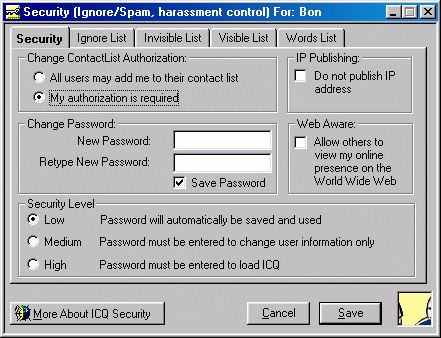
Figure 16. Security setting of ICQ
How does it work:
When the PRINCIPAL change contact list authorization and click the save button, the packet CMD_AUTH_UPDATE (1300) will be sent to ICQ server. This information will update the information stored in ICQ server.
The layout of CMD_AUTH_UPDATE (1300) is
|
Length |
Designation |
Description |
|
4 bytes |
Authorize |
0x0001 (No authorization is required) 0x0000 (Authorization is required) |
When the WATCHER wanted to have SUBSCRIPTION to PRESENCE INFORMATION. First the WATCHER would send CMD_META_USER (1610), which contains the UIN to search the information about that PRINCIPAL. ICQ server would send back a SRV_META_USER(990), which contains the nickname, UIN, email address and authorization status of the PRINCIPAL.
The layout of the SRV_META_USER(990) is
|
Length |
Designation |
Description |
|
2 bytes |
SUBCMD |
Sub-command |
|
1 bytes |
RESULT |
0x0A (Success) 0x32 (Failure) |
|
Variable |
DATA |
The data you request |
In this case, I am requesting the user information and the sub-command is META_USER_FOUND (410)
The layout of META_USER_FOUND (410) is
|
Length |
Designation |
Description |
|
2 bytes |
TOTAL_LENGTH |
Total data length without null terminal |
|
4 bytes |
UIN |
The user’s UIN |
|
2 bytes |
NICK_LENGTH |
Length of nickname with null terminal |
|
Variable |
NICK |
Nickname |
|
2 bytes |
FIRST_LENGTH |
Length of first name with null terminal |
|
Variable |
FIRST |
First name |
|
2 bytes |
LAST_LENGTH |
Length of last name with null terminal |
|
Variable |
LAST |
Last name |
|
2 bytes |
EMAIL_LENGTH |
Length of E-mail with null terminal |
|
Variable |
|
E-Mail address |
|
1 byte |
AUTORIZE |
0x00 (Authorization is required) 0x01 (No authorization is required) |
|
2 bytes |
X1 |
Zeros |
|
4 bytes |
X2 |
Zeros |
After getting the information about the PRINCIPAL, you are now ready to SUBSCRIBE the PRESENCE INFORMATION.
If no authorization is required, you can freely subscribe the PRESENCE INFORMATION. However, if the authorization is required, you have to send MSG_TO_NEW_USER (1110) to server.
The layout of MSG_TO_NEW_USER (1110) is
|
Length |
Designation |
Description |
|
4 bytes |
UIN |
User Identify Number |
|
2 bytes |
MSG_TYPE |
Unknown |
|
2 bytes |
DATA_LENGTH |
The length of data |
|
Variable |
NICK |
Nick name terminated with fe |
|
Variable |
FIRST |
First name terminated with fe |
|
Variable |
|
E-mail address terminated with fe |
|
2 bytes |
X2 |
Unknown terminated with fe |
|
Variable |
REQ_TEXT |
Text for request with null terminal. |
After ICQ server received this packet, ICQ server will inform the PRINCIPAL who controls the PRESENCE INFROMATION about the request. The PRICIPAL can authorize or decline the request. Thus the PRINCPAL can control which WATCHERS can have SUBSCRIPTIONS to the PRESENCE INFORMATION.

Figure 17. Authorization request
7) what PRESENCE INFORMATION a particular WATCHER will see for that PRESENTITY, regardless of whether the WATCHER gets it by fetching or NOTICATION.
Observations:
The only PRESENCE INFORMATION that the PRINCIPAL can control is “Invisible”. The PRINCIPAL can control this by adding WATCHERS to visible list, such that the WATCHERS in visible list were able to see the PRESENCE INFORMATION. However, all other PRESENCE INFORMATION such as online, away, not available, do not disturb and occupied are visible for all the WATCHERS except the WATCHER was added to invisible list.
How does it work:
During login process, the PRINCIPAL will send its status to server as well as the packet CMD_VIS_LIST (1710). The CMD_VIS_LIST (1710) contained all the WATCHERS’ UIN in your visible list.
The layout of the CMD_VIS_LIST (1710) is
|
Length |
Designation |
Description |
|
1 byte |
MUN_USERS |
Number of UIN in this packet |
|
4 bytes |
UIN_1 |
1st UIN in your list |
|
---------- |
---------- |
---------- |
|
4 bytes |
UIN_n |
Last UIN in your list |
After ICQ server received this packet, it will allow the WATCHERS in this list to see your PRESENCE INFORMATION.
8) which other PRINCIPALS, if any, can update the PRESENCE INFRMATION of that PRESENTITY.
Observation:
Once the PRINCIALS have added your UIN to their contact list. They can update your PRESENCE INFORMATION. In ICQ, you cannot control which PRINCIPALS can update the PRESENCE INFORMATION. You can only control which PRINCIPALS can see your PRESENCE INFORMATION. As long as your UIN is on their contact list, they can update your PRESENCE INFRONMATION once you changed your PRESENCE INFORMATION.
How does it work:
During the login process, you will send all the UINs in your contact list to tell ICQ server that whose PRESENCE INFORMATION you want to receive. This is done by sending the CMD_CONTACT_LIST (1030) to server.
The layout of CMD_CONTACT_LIST (1030) is
|
Length |
Designation |
Description |
|
1 byte |
NUM_CONTACTS |
Number of UINs in this packet |
|
4 bytes |
UIN_1 |
1st UIN in your contact list |
|
--------- |
---------- |
---------- |
|
4 bytes |
UIN_n |
Last UIN in your contact list |
After ICQ server received this packet, every time the PRINCIPALS in your contact list changed their PRESENCE INFROMATION. ICQ server will send the SRV_STATUS_UPDATE (420) to you automatically without the control of the PRINCIPAL.
The layout of the SRV_STATUS_UPDATE (420) is
|
Length |
Designation |
Description |
|
4 bytes |
REMOTE_UIN |
UIN of the user whose status has changed |
|
4 bytes |
STATUS |
The new online status of the user |
The PRINCIPAL controlling an INSTANT INBOX MUST be able to control
9) which other PRINCIPALS, if any, can send INSTANT MESSAGES to that INSTANT INBOX.
Observations:
By default, a PRINCIPAL can send INSTANT MESSAGES to all the INSTANT INBOXes except it is added to the ignore list. By adding undesired PRINCIPAL into ignore list, you can control which PRINCIPALS cannot send INSTANT MESSAGES to your INSTANT INBOX.
How does it work:
Each INSTANT MESSAGE follows a basic layout.
The layout of ICQ INSTANT MESSAGE is
|
Length |
Designation |
Description |
|
4 bytes |
UIN |
Local UIN |
|
2 bytes |
VERSION |
TCP protocol version |
|
4 bytes |
X1 |
Unknown |
|
4 bytes |
X2 |
Unknown |
|
4 bytes |
UIN |
Local UIN |
|
2 bytes |
TYPE |
Message type |
|
2 bytes |
MSG_LENGTH |
Length of message |
|
Variable |
MESSAGE |
Message text |
|
4 bytes |
TCP_MSG_IP |
LAN external IP |
|
4 bytes |
TCP_REALIP |
LAN internal IP |
|
4 bytes |
TCP_MSG_PORT |
Port of current message socket |
|
1 byte |
TCP_FLAG |
TCP capable flag |
|
2 bytes |
TCP_STATUS |
Client’s status |
|
2 bytes |
X3 |
Unknown |
When the client receive the INSTANT MESSAGE the UIN in the message will compared with the UIN in the contact list. If matched, the message is automatically disposed without any notification to the receiver. If not matched, the message will appear on the contact list.
10) which other PRINCIPALS, if any, can read INSTANT MESSAGES from that INSTANT INBOX..
Observations:
Each ICQ account is assigned a unique UIN. This UIN is associated to the INSTANT INBOX. You can only active one ICQ account at one time. The INSTANT MESSAGES in the INSTANT INBOX can only be read by the account with the same UIN as that of INSTANT INBOX. Thus ICQ does not allow PRICIPAL to control which PRICIPALS can read the INSTANT MESSAGES from the INSTANT INBOX.
11) The protocol MUST allow the creation of a SUBSCRIPTION both directly and via intermediaries, such as PROXIES.
Observation:
ICQ allows the creation of a SUBSCRIPTION both directly and via intermediaries. ICQ99 has build-in module to support Socks5 and Socks4 proxy.
How does it work:
In ICQ, the SUBSCRIPTION is done by sending REQ_ADD_TO_LIST (1110) to ICQ server. Fortunately, ICQ client support the communication between client and server through SOCKS5 and SOCKS4 proxy.
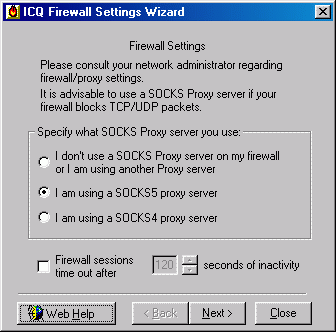
Figure 19. Choose the type of firewall.
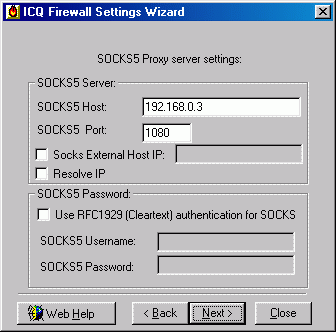
Figure 18. Locate the firewall and the port.
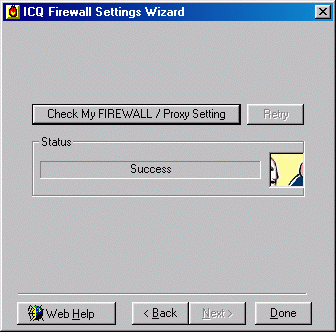
Figure 19. Test the firewall setting.
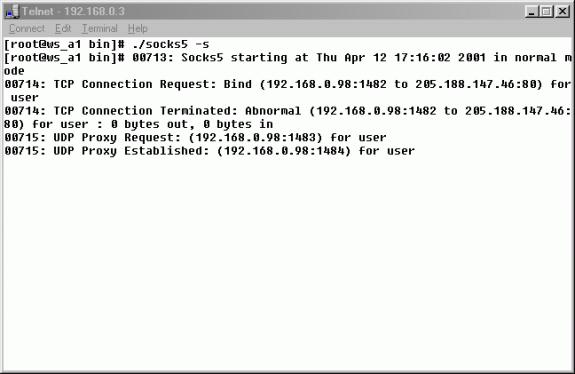
Figure 20. Test the firewall setting (server side)
The ICQ client can also support user authentication through proxy.

Figure 21. SOCKS5 user authentication using password
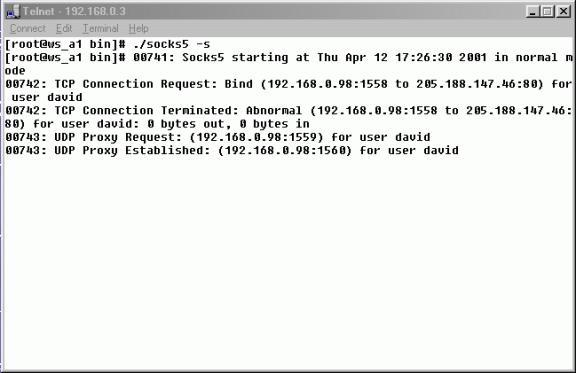
Figure 22. SOCKS5 user authentication using password (server side)
12) The protocol MUST allow the sending of a NOTIFICATION both directly and via intermediaries, such as PROXIES.
Observations:
ICQ allows the sending of NOTIFICATION both directly and via intermediaries. Since the NOTIFICATION is sent between client and server and ICQ supports the communication between client and server through firewall. There is no problem for ICQ to send NOTICICATION both directly and via intermediaries.
13) The protocol MUST allow the sending of an INSTANT MESSAGE both directly and via intermediaries, such as PROXIES.
Observation:
ICQ allows the sending of an INSTANT MESSAGE both directly and via intermediaries. However, the method of sending INSTANT MESSAGE through PROXIES must be “send through server” not peer-to-peer.
How does it work:
First ICQ will try to use direct TCP connection to send the message. However, ICQ doesn’t support peer-to-peer communication through firewall. After some trying, ICQ will send the message through server. ICQ sent the INSTANT MESSAGE using UDP packet, which will be added to SOCKS5 header before sending.
The following packet contains SOCKS5 header
0x0000: 00 00 00 01 CD BC 99 62 0F A0 05 00 00 00 00 00
0x0010: E1 8A 49 01 5B 1B 8D 8A D5 A8 4A EB EA A9 EE 82
0x0020: 1B 93 22 62 85 A8 A4 E8 E5 A9 CD 8D B3 C5 CA E8
Above packet is the sending message to server through SOCKS5 proxy.
14) The protocol proxying facilities and transport practices MUST allow ADMINISTRATIORS ways to enable and disable protocol activity through existing and commonly deployed FIREWALLS. The protocol MUST specify how it can be effectively filtered by such FIREWALLS.
Observation:
For ICQ99, once the UDP 4000 port was blocked by FIREWALL, protocol can be effectively filtered. However, for ICQ2000, the ICQ client has the function to scan ports on the FIEWALLS. ICQ2000 will use any available port to communicate with server including port 20, 23 and 80. As the result, there is no way to filter the latest ICQ protocol.
2. Additional Requirements for PRESENCE INFORMATION
1) All ENTITIES MUST produce and consume at least a common base format for PRESENCE INFORMATION.
Observations:
All the ENTITIES will produce and consume some common base format for PRESENCE INFORMATION.
How does it work:
During the login process, client will send the CMD_LOGIN (1000) packet to server to inform its status is “online”. Also, when the ENTITIES change to other status they will send CMD_STATUS_CHANGE (1240) to server. Upon receiving these packets, server will inform other ENTITIES about this PRESENCE INFORMATION by sending SRV_USER_ONLINE (110) or SRV_STATUS_UPDATE (420) to every PRINCIAL who have subscriptions to the PRESENCE INFORMATION. Thus, all the ENTITIES will produce some common base format (CMD_LOGIN and CMD_STATUS_CHANGE) and consume some common base format (SRV_USER_ONLINE and SRV_STATUS_UPDATE) for PRESENCE INFORMATION.
How does it work:
Upon changing the status, all the ENTITIES will produce the same packet which will follow the layout shown below.
The layout of CMD_STATUS_CHANGE (1240) is
|
Length |
Designation |
Description |
|
4 bytes |
STATUS |
The new status |
STATUS can be one of the following values
|
Statuses |
||
|
Designation |
Value |
Description |
|
STATUS_ONLINE |
00 00 00 00 |
User is online |
|
STATUS_AWAY |
01 00 00 00 |
User is away |
|
STATUS_DND |
13 00 00 00 |
Do Not Disturb |
|
STATUS_INVISIBLE |
00 01 00 00 |
User is invisible |
|
STATUS_OCCUPIED |
10 00 00 00 |
Occupied |
|
STATUS_NA |
04 00 00 00 |
Not Available |
|
STATUS_CHAT |
20 00 00 00 |
Free for chat |
2) The common presence format MUST include a means to uniquely identify the PRESENTITY whose PRESENCE INFORMATION is reported.
Observations:
All the packets CMD_LOGIN, CMD_STATUS_CHANGE, SRV_USR_ONLINE and SRV_STATUS_UPDATE include a means to uniquely identify the PRESENITITY whose PRESENCE INFORMATION is reported since the client allows the users to see PRESENCE INFORMATION of individual user.
How does it work:
All the packets CMD_LOGIN, CMD_STATUS_CHANGE, SRV_USER_ONLINE and SRV_STATUS_UPADTE contain the UIN of the specific user. However, the UIN in the packets CMD_LOGIN and CMD_STATUS_CHANGE is not included in the command itself. Rather the UIN is contained in the packet header. The UIN is the mean that ICQ uses to identify different users.
The layout of SRV_USER_ONLINE (110)
|
Length |
Designation |
Description |
|
4 bytes |
UIN |
UIN of the user who changed status |
|
4 bytes |
IP |
The user’s IP address |
|
4 bytes |
PORT |
The port the user is listening for connections on |
|
4 bytes |
REAL_IP |
User’s real IP address |
|
4 bytes |
REAL_IP |
User’s real IP address |
|
1 byte |
X1 |
Unknown |
|
4 bytes |
STATUS |
User’s new status |
|
4 bytes |
X2 |
Unknown |
|
4 bytes |
X3 |
Unknown |
|
4 bytes |
X4 |
Unknown |
|
4 bytes |
X5 |
Unknown |
|
4 bytes |
X6 |
Unknown |
|
4 bytes |
X7 |
Unknown |
The first field of the packet is the UIN of the user who changed the status. Thus this packet will provide the mean to identify the user.
3) If the PRESENCE SERVICE has SUBSCRIPTIONS for a PRESENTITY’s PRESENCE INFORMATION, and that PRESENCE INFORMATION changes, the PRESENCE SERVICE MUST deliver a NOTIFICATION to each SUBSCRIBER, unless prevented by the PRESENTITY’s ACCESS RULES.
Observations:
When the user has been added to your contact list that means you had subscription to that user’s PRESENCE INFORMATION. If the PRESENCE INFORMATION of this user changed, ICQ server will deliver a NOTIFICATION to you.
How does it work:
If you have added a user on to your contact list, you have subscription to this user’s PRESENCE INFORMATION. During the login process, you will send the CMD_CONTACT_LIST to tell server you have subscription to whose PRESENCE INFORMATION and server will remember this information. When the user on your contact list changed status, the user will send CMD_STATUS_CHANGE packet to tell server “I am online!!”. Server will produce the NOTIFICATION (SRV_STATUS_UPDATE) to you. Thus you can get the NOTIFICATION each time when the user’s PRESENCE INFORMATION has changed.
4) The protocol MUST include mechanisms to PRESENCE INFORMATION to be cached.
Observations:
ICQ server will cached the PRESENCE INFORMATION. Since if you are suddenly disconnected from ICQ server due to unanticipated failure, your status will be unchanged for a moment.
How does it work:
The server will cache the status for about two minutes. If the client doesn’t send the CMD_KEEP_ALIVE to server for about two minutes, server will assume this user went offline already. By default, the packet CMD_KEEP_ALIVE is sent to ICQ server every two minutes to tell the server the user is still connected to the server.
5) The protocol MUST include mechanisms to allow cached PRESENCE INFORMATION to be updated when the master copy changes.
Observations:
The master copy of PRESENCE INFORMATION is in the local machine and the cached PRESENCE INFORMATION is located in server. Each time when the master copy changes, the cached PRESENCE INFORMATION will be changed accordingly.
How does it work:
Each time when the master copy of PRESENCE INFORMATION changed. The client will send CMD_STATUS_CHANGE (1240) to ICQ server to update the cached PRESENCE INFORMATION. The ICQ server then sends SRV_STATUS_UPDATE to all the SUBSCRIBERS of this PRESENCE INFORMATION.
3. Additional Requirements for INSTANT MESSAGES
1) All ENTITIES sending and receiving INSTANT MESSAGES MUST implement at least a common base format for INSTANT MESSAGES.
Observations:
All the ICQ clients will generate the common format for INSTANT MESSAGES. Since in ICQ, the sending message is peer-to-peer communication, there is no intermediary to change the message format. In order to be compatible, all the clients will generate the same message format. Thus there is no problem for the old version of clients to understand the message sent from new version of client.
How does it work:
All the clients will generate the same format of INSTANT MESSAGE shown in page ??
2) The common base format for an INSTANT MESSAGE MUST identify the sender and intended recipient.
Observations:
Each message has some fields, which contain information to identify the sender and intended recipient. From the identifier, you can get the information about who is sending this message to you.
How does it work:
Again the identifier is UIN. From table ???. Each INSTANT MESSAGE has the fields to contain both local UIN to identify who is the sender. However, the only to way to identify the recipient is from the IP address and the port number.
3) The common message format MUST include a return address for the receiver to reply to the sender with another INSTANT MESSAGE.
Observations:
Each ICQ INSTANT MESSAGE contains the return address of the sender. This address is IP address and the port number of the messaging socket.
4) The protocol MUST include mechanisms so that a sender can be informed of the SUCCESSFUL DELIVERY of and INSTANT MESSAGE or reasons for failure.
Observations:
After the send button is clicked, the sending message started. However, the sending message dialogue will not disappear unless the receiver has received the INSTANT MESSAGE.
How does it work:
After the “send” button is clicked, the message is being sent. However, the message dialogue will not disappear unless the sender receives the message ack packet.
The layout of the message ack packet is :
|
Length |
Designation |
Description |
|
4 bytes |
UIN |
Receiver’s UIN |
|
2 bytes |
TCP_VER |
TCP version |
|
4bytes |
X1 |
Random number |
|
2 bytes |
X2 |
Random number |
|
2 byte |
ZERO |
Zero |
|
4 bytes |
UIN |
Receiver’s UIN |
|
2 bytes |
MSG_TYPE |
Message type |
|
2 bytes |
MSG_LENGTH |
Length of message |
|
4 bytes |
IP |
Receiver’s IP |
|
4 bytes |
IP |
Receiver’s internal IP |
|
2 bytes |
PORT |
Receiver’s port number |
|
2 bytes |
TCP_FLAG |
TCP capable flag |
|
2 bytes |
STATUS |
Client’s status |
|
4 bytes |
X3 |
Unknown |
Receiver will send this packet after receiving the message and process it successful.
5.2 Security issues of ICQ
Why ICQ is so insecure?
There are two main reasons made ICQ so insecure.
1. Too many operations are done by the client
2. The people at Mirabilis do not concert about security during developing ICQ protocol.
First of all, client side operations make ICQ more vulnerable to attacks because of several reasons. Take message spoofing as an example. It is possible to spoof messages on ICQ, i.e. send fake messages that will appear to be sent from a different, user because ICQ will receive messages from any IP address. As I have mentioned before, there are two methods to send messages – send messages directly and send through server. Some people choose to tell their client to send their message directly while others prefer to send messages through server, so ICQ will simply receive messages from anyone, not only the server. If all messages were sent through the server, ICQ would not receive messages from anyone else from server and it would have made spoofing messages and other ICQ events much harder because the client will only receive messages from server and will reject all the messages from somewhere else.
Second, take IP un-hider crack as an example. Your ICQ client need to know the IP address in order to send them messages. If sending messages was possible only through the server, your ICQ client would have to contact the server and tell it to send the messages to the UIN without knowing this UIN’s IP address. The server, on the other hand, knows everyone’s IP address, so it does the delivery for you. By doing so, the only one way to reveal a UIN’s IP address is to access the server, which would certainly be much difficult to crack an individual’s PC.
CHAPTER SIX – CONCLUSION
ICQ Protocol has past several versions. Each new version is better and more complicated than previous versions. From the comparison of ICQ protocol against IMPP requirements in CHAPTER FOUR, we can conclude that ICQ protocol version 5 meets most of IMPP requirements proposed by Network Working Group.
However, the security issues of ICQ are still a major concert of most companies. Now all the ICQ clients are beta version. Thus there are still many things to do before ICQ can be officially released.
6.1 Limitations
There are some limitations during doing this project. Since ICQ is reverse engineered by a random group of people based on the packets dumped from ICQ clients. There is no official site to introduce and describe the details of ICQ protocol. All the information provided on Internet is the results of a group of people who are interested in ICQ. Thus there is no information found or provided in this document is guaranteed to be correct or accurate. All the layout of the packets presented in CHAPTER FOUR are not 100% correct.
Also, although different versions of ICQ clients may use the same version of ICQ protocol, there are still different packets for the same function. The raw data captured from different version of ICQ client are slightly different. Some of them have not yet been documented. So I have to reverse engineer to found out the protocol from scratch.
The latest version of ICQ protocol (version 7) is more complicated than all the previous versions. There is not yet any document describes about this version of ICQ protocol. Although the basic operation of all the ICQ clients is the same, the protocols are totally different.
6.2 Future development
Now the ICQ Company not yet developed any ICQ client that can be installed and running on Linux. All the clients developed to run on Linux are developed by individuals. These people all need to understand ICQ protocol in order to develop a robust ICQ client to run on different platforms. Today, all the ICQ clients running on Linux are using ICQ protocol version 5 because there is a document with an excellent description about ICQ protocol version 5. However, this document is not robust. There are still many missing packets. Now, the latest version of ICQ protocol (version 7) is totally mystery. There is not any document describes about this protocol.
There are still many things can be done to ICQ. Today, many ICQ clients are available but there is no ICQ server provided yet. Based on the document “Version 5 of the ICQ Protocol” we can develop a simple ICQ server for internal user i.e. use the official ICQ client provided by Mirabilis companion with a self developed simple ICQ server. By doing so, we can use ICQ in an internal LAN, ICQ protocol will no longer face the problem of expose the IP address to the outside world.
Feather more ICQ protocol version 7 is being analyzed by many people. If we can un-cover the ICQ protocol version 7 and comprehend it, it is not difficult to develop a powerful ICQ client using ICQ protocol version 7.
6.3 Overall conclusion
During the project, I have learned a lot of things during the progress. First of all, I have a deep understanding on how the ICQ protocol works and get the ideas of how it works and how to reverse engineer to found out the protocol. Second, I have learned how to get help from the Internet when I have something do not understand. Although the process of reverse engineer to found out the protocol is very difficult, I can solve most of the problems and discuss with the people who are also interested in ICQ protocol to find out the solutions. Third, I learned more about Linux during setting up the SOCKS 5 firewall. I have to think about the architecture before setting up the experimental setups.
This project not only provides the chance for me to develop my analysis skill, but also give me the chance to learn more about technologies, project design and development skills. The most important is that the project let me meet a nice group of people with the same interest. I have learned how to express my major problem and get help from the Internet. I believe those things I learned from this project will help me to develop myself in I.T. field and will be very helpful in the future.
References
[1] Henrik Isaksson, Version 5 of the ICQ Protocol.
http://www.algonet.se/~henisak/icq/icqv5.html
[2] http://www.student.nada.kth.se/~d95-mih/icq/
[3] Tom Ueltschi, The ICQ Protocol
[4] Sebastien Dault, ENCRYPTION and CHECKCODE of the ICQ Protocol V4
http://www.algonet.se/~henisak/icq/encrypt-V5.txt
[5] Sebastien Dault, ENCRYPTION and CHECKCODE of the ICQ Protocol V5
http://www.algonet.se/~henisak/icq/encrypt-V5.txt
[6] Mark Grennan, Firewall
and Proxy Server HOWTO, Feb. 2001.
http://www.ibiblio.org/mdw/HOWTO/Firewall-HOWTO.html
[7] Network Working Group,
SOCKS Protocol Version 5, March 1996
http://www.socks.nec.com/rfc/rfc1928.txt
[8] Network Working Group, Instant Messaging / Presence Protocol Requirements, RFC 2779, Feb 2000
http://www.ietf.org/rfc/rfc2779.txt
[9] Network Working Group, A Model for Presence and Instant Messaging, RFC 2778, Feb 2000.
http://www.ietf.org/rfc/rfc2778.txt
[11] AIM/Oscar Protocol Specification
http://aimdoc.sourceforge.net/OSCARdoc/
[12] Mailing list, ICQ-devel” icq-devel@blipp.com